TealBackup TM Protect your data from loss
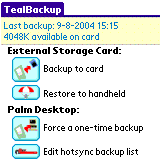
Backup your valuable data with TealBackup, the complete back up, copy, and restore system.
With exclusive support for both external card and HotSync backups, you have full control over where and
how files are saved. Plus, the combo of manual and automated card backups helps keep your critical
files safe, even if you're miles away from a computer.
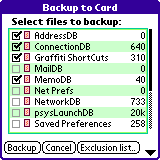
Features include backups to SD/MMC/CF cards and Memory Stick, backups though HotSync,
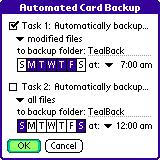
manual backups, incremental backups, dual-timer automatic backups,
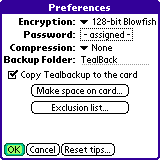
optional encryption, optional compression, multiple backup folders,
exclusion lists, inclusion lists, backup logs, and application-locking for NVFS stability.
TealBackUp is PalmOS 5 compatible and works with all popular devices
including Treo, Tungsten, Zire, Sony, and Kyocera handhelds.
Enhanced with special support for: PocketPC No Palm Pre No Palm Pixi No WebOS No PalmOS 3 Yes Palm Hi-res Yes Palm Full screen Yes Palm Landscape Yes PalmOS 4 Yes Sony Hi-res Yes Sony Full screen Yes Sony Landscape Yes PalmOS 5 Yes HandEra Hi-res Yes HandEra Full screen Yes Dana Wide screen Yes 5-Way Nav Yes Jog Dial Yes Samsung Full screen Yes SD/CF/MS cards Yes
Recent Updates: Version 1.71 - March 26, 2009
Fixed crash when run from card by some third party launchers
Version 1.70 - June 11, 2008
Added ability to backup readonly/ROM files by removing them from new special 'ROM' exclusion list
Added new 'Activation' preference screen
Added new merge tool (menu) to allow merging of multiple incremental backup folders
Added preference option to overwrite files during restore when a read-only or ROM copy of the file already exists.
Improved backup code to keep device awake during countdown or copying large file
Improved backup code to remove 0-sized deleted records before backup to improve speed
Improved layout of scroll bar on file selection screens
Fixed ability to select backups for restore when more than one volume (such as internal+SD) contains backups
Fixed crash caused by navigating into subfolders on exclusion list
Fixed PalmOS from locking up virtual graffiti area after rotating display
Version 1.60 - February 19, 2008
Added support for backing up and restoring files with invalid record sizes (0 or >64k)
Fixed file verification to work with records larger than available application working memory
Improved auto-timeout dialogs to keep device open to keep short auto-sleep times from kicking in during auto backup
Version 1.57 - November 29, 2007
Fixed restoring of large databases larger than 4000 records
Added new 'Auto' prefs option to select thinline fonts for all except buttons
Added extra messages if 'detailed logs' on showing causes when card restore fails
Version 1.54 - October 11, 2007
Added option to verify each backed up file
Added option to backup to internal storage volumes (for temporary copies)
Added option to automatically delete old dated automatic backup folders
Added option to automatically delete old undated manual backup folders
Added option to launch specified app or return to previous app after automated backup
Added new ability to delete folders even when not empty in delete screen
Added new log entries when files verified and for folders deleted
Added new standard wait dialogs for abortable functions
Improved data consistency checking for card-to-card copies
Improved visual style with new skinny fonts and shaded buttons
Improved preferences settings with categorized screens and overall menu
Improved progress bar display to advance consistently forward when scanning multiple folders
Fixed automated backup failures when device reset 7 or more times between backups
Fixed double-dates from being appended if device is reset after backup before exiting program